
File Handling
Introduction:
C is a programming language that provides a number of powerful tools for working with files. Files can be used to store data, read data, and write data. In this blog, we will discuss the basics of file handling in C.
What is a file?
A file is a collection of related data that is stored in secondary memory. Files are used for a variety of purposes, such as storing data, reading data, and writing data.
Need for File Handling in C:
There is a time when the output generated by compiling and running the program does not serve the purpose. If we want to check the output of the program several times, it becomes a tedious task to compile and run the same program multiple times. This is where file handling comes into play. Here are some of the following reasons behind the popularity of file handling:
Types of files:
There are two types of files in C: text files and binary files. Text files are files that are written in plain text, such as a .txt file. Binary files are files that are written in binary format, such as a .jpg file.
Opening a file:
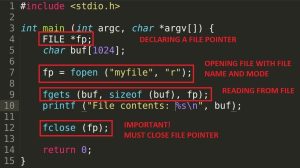
Before you can work with a file, you must first open it. The fopen() function is used to open a file. It takes two arguments: the name of the file and the mode in which to open the file.
For example, to open a file named “example.txt” in read mode, you would use the following code:
makefileCopy code
FILE *fp; fp = fopen(“example.txt”, “r”);
Reading data from a file :
Once a file has been opened, you can read data from it. The fscanf() function is used to read data from a file. It takes two arguments: the file pointer and a format specifier.
For example, to read an integer from a file, you would use the following code:
cCopy code
int num; fscanf(fp, “%d”, &num);
Writing data to a file:
You can also write data to a file. The fprintf() function is used to write data to a file. It takes two arguments: the file pointer and a format specifier.
For example, to write an integer to a file, you would use the following code:
cCopy code
int num = 10; fprintf(fp, “%d”, num);
Closing a file:
Once you are done working with a file, you must close it. The fclose() function is used to close a file. It takes one argument: the file pointer.
For example, to close a file, you would use the following code:
scssCopy code
fclose(fp);
Conclusion:
In this blog, we have discussed the basics of file handling in C. We have covered opening a file, reading data from a file, writing data to a file, and closing a file. Files are an important part of programming and knowing how to work with them is essential for any programmer.
Summary:
In this tutorial, we discussed an important concept in the C, that is, file handling. We understood the basic meaning of file handling, why is it used and what are the 2 types of data files available in C? Further, we even discussed the various operations associated with both the types of data files with the help of illustrative programs
REFERENCE:
https://data-flair.training/blogs/file-handling-in-c/
https://www.startertutorials.com/blog/files-in-c.html
V.Mohan Kumar
22VV1A1264
Information technology